User-Defined Fields
User-Defined Fields
Add fields to the Program that are defined in Mileposts and added manually

Add new User-Defined Field
General Tab
Program: Defined on the Programs page (Not Editable)
Name: Name of the field
Display Name: How the field is displayed
Public Key: This will be auto-generated (No Action Needed)
Data Type: Choose from the following. This is how the data will be entered
Text
Checkbox
List
Manage
Locally: Within Mileposts
Remotely: From Student Information System
Show on Listing Page: Yes or No (Checked = Yes)

Audit Tab: Audit Information is a basic timeline including the following:
Created on
Created by
Modified on
Modified by
Click Save

Table
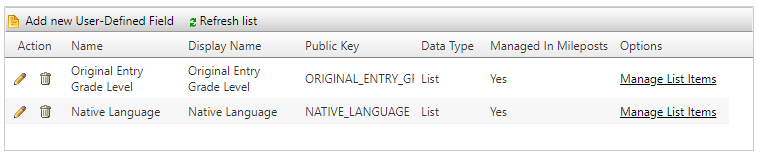
Action
Edit
Delete
Name: Name of the field
Display Name: How the field is displayed
Public Key: This will be auto-generated (No Action Needed)
Data Type
Managed in Mileposts: Yes or No
Options
Manage List Items
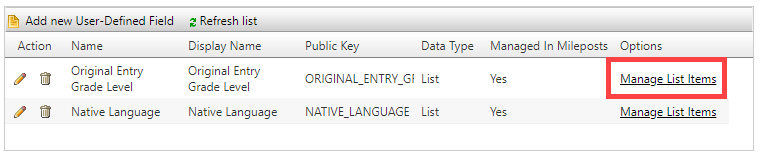
Add new Item/Edit


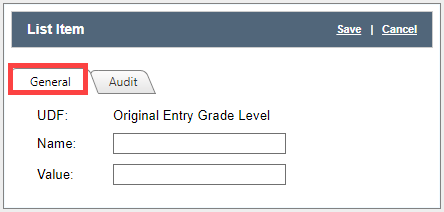
General Tab
UDF:User Defined field
Name: Item Name
Value: What will be displayed
Audit Tab: Audit Information is a basic timeline including the following:
Created on
Created by
Modified on
Modified by
Click Save
Table

Action
Reorder: Order shown on this table is how it will be displayed
Edit
Delete
Name : Item Name
Value: Display Name
Related Articles
Student User-Defined Fields
Student User-Defined Fields Add new Student User-Defined Fields/Edit General Tab Name: Field Name Display Name: Name that the user sees Public Key: Auto defined No added task to complete Data Type: Select the data type from the Dropdown Manage ...Programs Admin Setup
Students participate in Programs that are standard or defined by the district (ie GATE, ELL,504 etc). Programs Page Add New Programs/Edit General Tab Name: Name of the Program Public Key: This will auto generate (No action needed) Active: Is the ...User Accounts
Login to EdHub as an Adminstrator Click Admin Click User Accounts First page of User Accounts is a table of users The headers on the table are: Action Used to edit (pencil icon) or delete (garbage can) users First Name Users First Name Last Name ...User Accounts
Click User Accounts First page of User Accounts is a table of users The headers on the table are: Action Used to edit (pencil icon) or delete (garbage can) users First Name Users First Name Last Name Users Last Name ID Users Identification Status ...User Tags
User Tags are used to group staff members with similar characteristics. This is different from groups because groups are associated with permissions. User Tags is for people of a common type (ie math teachers, teachers with less than 3 yrs experience ...